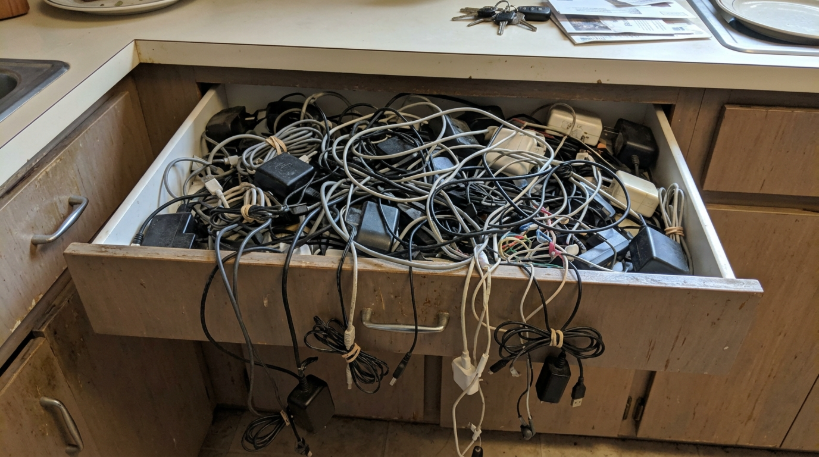
Every home has one: the cable drawer. Mine was a tangled nest of chargers and wires collected over fifteen years. Old phone chargers with connectors nobody uses anymore. A camera cable for a camera I sold years ago. Three different laptop power bricks. Earphone cables, headphone cables, a mysterious cable with a connector I could not identify at all. Whenever I needed to charge something, I would dig through the tangle hoping to find the right one.
A few months ago, I finally emptied the drawer onto the kitchen table and sorted through it. What I discovered was that most of my current devices now charge through the same connector: USB-C. My phone, laptop, earbuds, tablet, e-reader, and even my electric toothbrush. For the first time in my life, one cable could charge almost everything I own. That realization led me to rethink my whole relationship with chargers, and to learn that “one cable for everything” is not quite as simple as it sounds.
How we ended up with so many cables
For a long time, every device seemed to have its own charging connector. Phone makers used different plugs, sometimes changing them between models. Cameras, game controllers, music players, and laptops each had their own standards. Every new device came with a new charger, and every old charger quickly became useless.
That chaos created a lot of waste and frustration. People threw away perfectly working chargers because they no longer fit anything. Travelers carried bags full of different cables. Borrowing a charger from a friend was a gamble, because there was a good chance theirs would not fit your device.
Gradually, the industry moved toward common standards, first with older micro-USB connectors and then with USB-C. Regulators also pushed for change. The European Union, for example, adopted rules requiring many types of electronic devices sold there to use USB-C for charging. Combined with manufacturers’ own shift toward the standard, this has made USB-C close to universal for new devices.
The joy of one cable
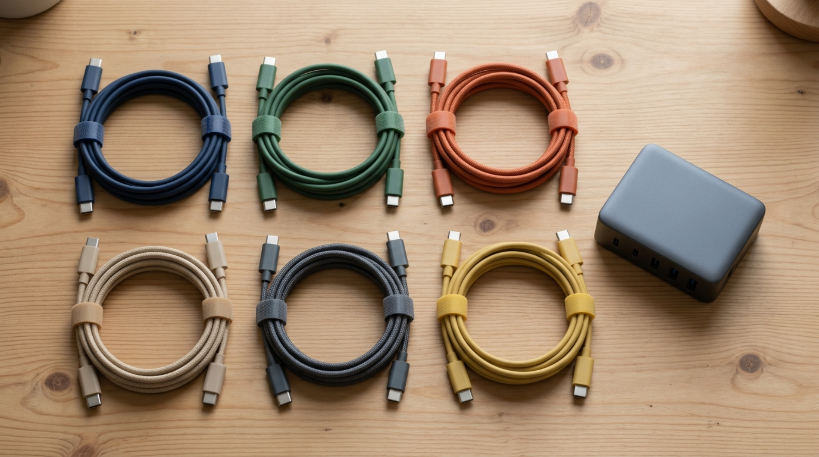
The practical benefits became obvious immediately after my drawer cleanup. I now keep one good USB-C cable by the bed, one at my desk, and one in my bag. Whatever device needs charging, the cable fits. When friends visit and need to charge their phones, I can almost always help.
Travelling has become much easier too. Where I used to pack a separate charger for each device, I now pack one compact multi-port charger and two cables. My whole charging kit fits in a small pouch. It is one of those quiet improvements that you only appreciate once you remember how annoying things used to be.
It also means fewer chargers need to be manufactured and thrown away. Many new devices are now sold without a charger in the box, on the assumption that people already have compatible ones. That was controversial at first, but for people like me with a drawer full of chargers, it makes sense.

The catch: not all USB-C cables are equal
Here is where things got complicated. When I started testing my collection, I found that some USB-C cables charged my laptop quickly while others barely charged it at all. Some transferred files fast, others painfully slowly. One cable could connect my laptop to an external monitor; another, identical in appearance, could not.
The reason is that USB-C describes the shape of the connector, not what the cable can do. Behind that same oval plug, cables vary enormously in how much power they can carry, how fast they can move data, and whether they support video. A cheap cable that came with a pair of earbuds might only support slow charging and basic data. A more expensive one might handle high-power laptop charging and fast data transfer.
Unfortunately, cables are rarely labeled clearly. Two cables can look exactly the same while performing very differently. This is one of the biggest frustrations with USB-C, and it took me some research to understand.
Understanding charging power
Charging power is usually measured in watts. Phones typically charge with relatively low wattages, while laptops need much more. For high-power charging, both the charger and the cable must support it. If either one cannot, the device charges more slowly, or in some cases a laptop might not charge at all while in use.
Many cables and chargers now display their maximum wattage on the packaging or the cable itself. When buying new cables, I started looking for this information. For my laptop, I needed a cable rated for higher power. For my phone and earbuds, almost any decent USB-C cable was fine.
Chargers matter too. A small phone charger might technically fit a laptop, but it will charge it very slowly. I replaced my collection of old chargers with one multi-port charger that can deliver enough power for my laptop while charging my phone at the same time. It replaced four separate bricks.
Data and video: the hidden differences
Data transfer speeds vary even more. Some USB-C cables support only older, slow data speeds, which is fine for charging but frustrating if you want to copy large files from a camera or external drive. Others support much faster transfers. Similarly, some cables can carry a video signal to a monitor, and others cannot.
For most people, this only matters occasionally. But if you use external drives or connect a laptop to a monitor, it is worth having at least one high-quality cable that supports fast data and video, and labeling it so you do not accidentally use it for everyday charging and lose track of it.
That is exactly what I did. I bought a small set of colored cable tags. My full-featured cable got a bright tag, my standard charging cables got another color, and anything slow or questionable went in a separate box for emergencies.

How I tested which cable could do what
Since my cables were not labeled, I had to figure out their abilities myself. For charging, I used a simple trick: I plugged each cable into my laptop with the same high-power charger and checked the charging status. Some cables showed the laptop charging normally, while others showed a warning that it was charging slowly. That alone separated my high-power cables from the basic ones.
For data, I copied the same large folder of photos to an external drive using each cable and timed it. The differences were dramatic. One cable finished in under a minute, while another took more than ten. For video, I simply tried connecting my laptop to a monitor with each cable and noted which ones worked.
Small inexpensive USB testers also exist, which plug in between a charger and a device and display the power flowing through. I borrowed one from a friend, and it confirmed what my simpler tests had shown. It took about an hour to test everything, but afterwards I finally knew what each cable in my house could actually do.
Safety: why cheap cables can be risky
While researching, I came across warnings about very cheap, unbranded cables and chargers. Poorly made products may lack proper safety features, which in rare cases can damage devices or cause overheating. With higher-power charging, quality matters more. A laptop charging at high wattage puts real demands on the cable and charger.
I am not suggesting everyone needs expensive cables. Many affordable cables from reputable sellers work perfectly well. But I stopped buying the cheapest possible options from unknown sellers, especially for chargers. Looking for recognized safety certifications on packaging and buying from established retailers is a reasonable precaution.
I also threw away a couple of cables with frayed ends and one charger that got unusually hot. Old, damaged cables are not worth the risk, even if they still seem to work.
What to do with the old cables
After sorting, I had a large pile of cables and chargers I would never use again. Throwing them in the bin felt wrong, since they contain copper and other materials that can be recovered. I took them to a local electronics recycling point, where they accepted all kinds of cables and small electronics.
A few cables I kept for older devices that still matter, like a camera I still use occasionally and a pair of older headphones. Those went into a small labeled box, separate from my everyday USB-C setup. Everything else left the house.
The adapters that bridge old and new
Not every device in my life uses USB-C yet. An older pair of wired headphones, a portable speaker, and a camera still use older connectors. Instead of keeping separate chargers for all of them, I bought a couple of small adapters that convert USB-C to those older plugs. They live in the same pouch as my travel charger.
This approach let me keep using older devices without letting them dictate my charging setup. The goal was never to replace working devices just because they use older connectors. It was to make USB-C the center of the system and treat everything else as an exception, handled with a small adapter rather than a whole extra charger.
My simple charging system now
My new setup is almost boring in its simplicity. One multi-port charger at my desk, with a high-power cable for the laptop and a standard cable for the phone. One charger and cable by the bed. One compact travel charger and two cables in my bag. One labeled high-performance cable for data and monitors. That is it.
The cable drawer still exists, but it is mostly empty now. A few spare cables, a couple of adapters for older devices, and nothing else. Finding the right cable no longer involves untangling a nest of wires.
A small standard with a big effect
It is easy to overlook how much a simple standard can improve everyday life. A shared connector does not sound exciting, but it has removed a constant small frustration and reduced a surprising amount of waste in my home. It also shows that technology does not always need to add features to improve. Sometimes the best improvement is simply agreement.
There is still room for things to get better, especially clearer labeling so people can tell what each cable can do. But compared with the drawer I emptied onto the kitchen table, the current situation feels like a small revolution. One plug, many devices, and finally a little order in the chaos.
